Themes
Built-in themes
Section titled “Built-in themes”| Name | Source |
|---|---|
dracula | JetBrains / Dracula palette |
nord | Nord |
catppuccin | Catppuccin (Mocha) |
monokai | Monokai |
dark | Neutral dark (CLI-style) |
light | Neutral light (light terminals) |
Apply any of them by name:
from loguru import loggerfrom loguru_themes import apply_theme
apply_theme(logger, "monokai")
Previews
Section titled “Previews”Sample output of every level under each theme (the theme name is shown in each window’s title bar):
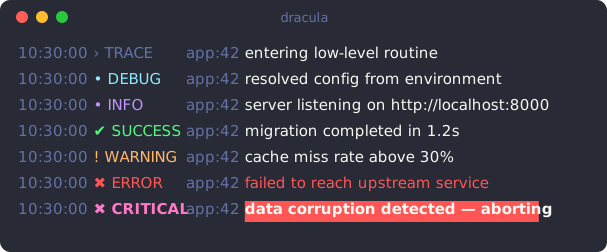
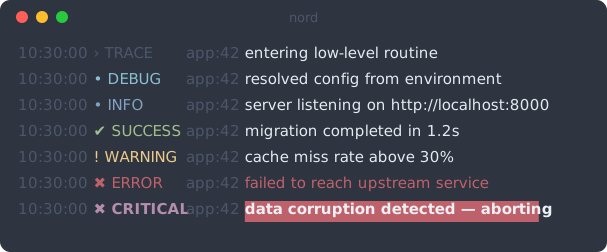
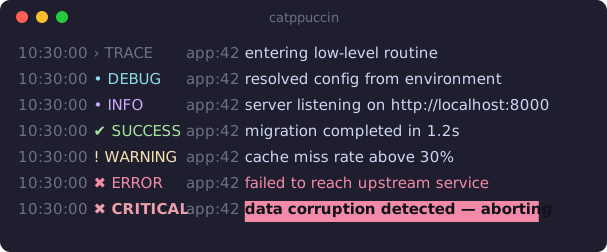
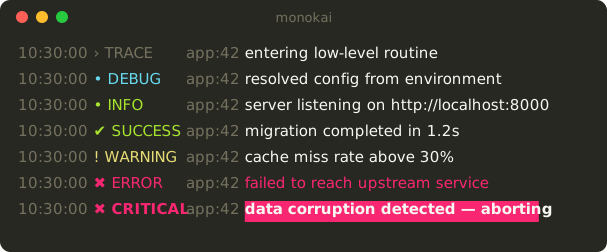
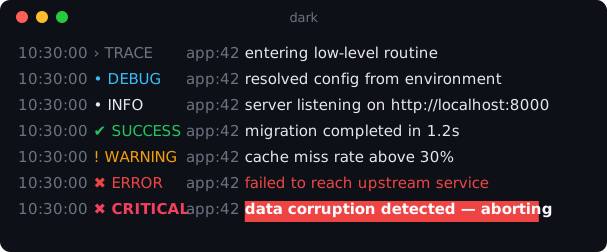
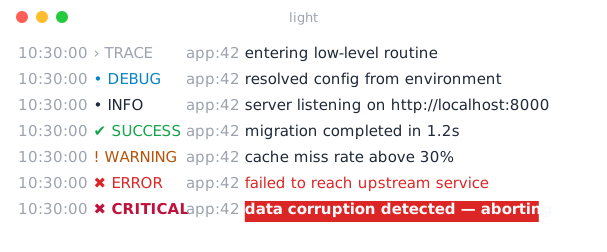
Palette (background colors)
Section titled “Palette (background colors)”The 16-color palette of each theme — the colors native tags like <red> /
<RED> map to:






Listing themes
Section titled “Listing themes”from loguru_themes import list_themes
list_themes()# ['catppuccin', 'dark', 'dracula', 'light', 'monokai', 'nord']Names are case-insensitive ("Dracula" works). An unknown name raises a
KeyError listing the available names.
Getting a theme object
Section titled “Getting a theme object”from loguru_themes import get_theme
theme = get_theme("dracula")theme.levels["INFO"].color # '#bd93f9'theme.accent, theme.dim, theme.fgUseful when you want to inspect or customize a theme, or reference its colors in your own format.
Highlights
Section titled “Highlights”- ERROR renders the message text in red (like the standard
logginglook). - CRITICAL renders the message bold on a red background to stand out.
Both are configurable per level — see Customizing.
Light vs dark
Section titled “Light vs dark”dark/light are tuned for dark/light terminal backgrounds respectively;
dracula, nord, catppuccin, and monokai are dark-background palettes.