Getting started
Install
Section titled “Install”pip install loguru-themesRequires Python 3.9+ and loguru>=0.7 (installed automatically).
Apply a theme
Section titled “Apply a theme”One call configures the console sink — format, per-level colors, and icons:
from loguru import loggerfrom loguru_themes import apply_theme
apply_theme(logger, "dracula")
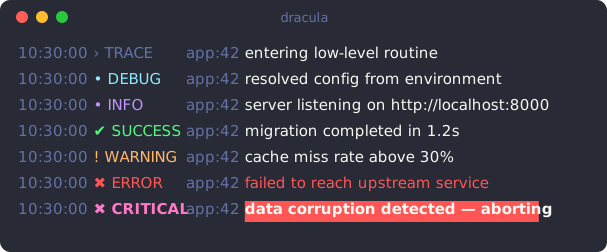
logger.trace("entering low-level routine")logger.debug("resolved config from environment")logger.info("server listening on http://localhost:8000")logger.success("migration completed in 1.2s")logger.warning("cache miss rate above 30%")logger.error("failed to reach upstream service")     # red message textlogger.critical("data corruption detected — aborting")  # bold on red background
apply_theme takes over the logger’s console output (it removes existing
handlers — the idiomatic loguru setup) and installs a single themed sink. Each
level gets its theme color, and the level icon shares that color.
Choosing a theme
Section titled “Choosing a theme”Pass any built-in name (autocompleted by your IDE) or a Theme object:
apply_theme(logger, "nord")apply_theme(logger, "catppuccin")See Themes for the full list, or Customizing to tweak one.
What’s next
Section titled “What’s next”- Themes — the built-in palettes and how to list them
- Icons — change or disable the per-level icons
- Customizing — derive your own theme
- Color scheme — native color tags follow the theme
- Use your own logger — keep your own sinks and format